Player Portrait
Shows your name, level, HP, and Energy. Your portrait may also change when head gear is equipped.
This page explains how to read the screen, use the main inputs, and avoid the most common control-related mistakes. If Covert Cats feels strange at first, this is usually the page that makes everything click.
Covert Cats uses a fairly traditional RPG-style interface, but several parts of the interface matter more than they first appear to. Your HUD is not just decoration. It is where you monitor your health, Energy, buffs, target, party state, chat, and active abilities.
Learning the screen early will make almost every other system easier to understand.
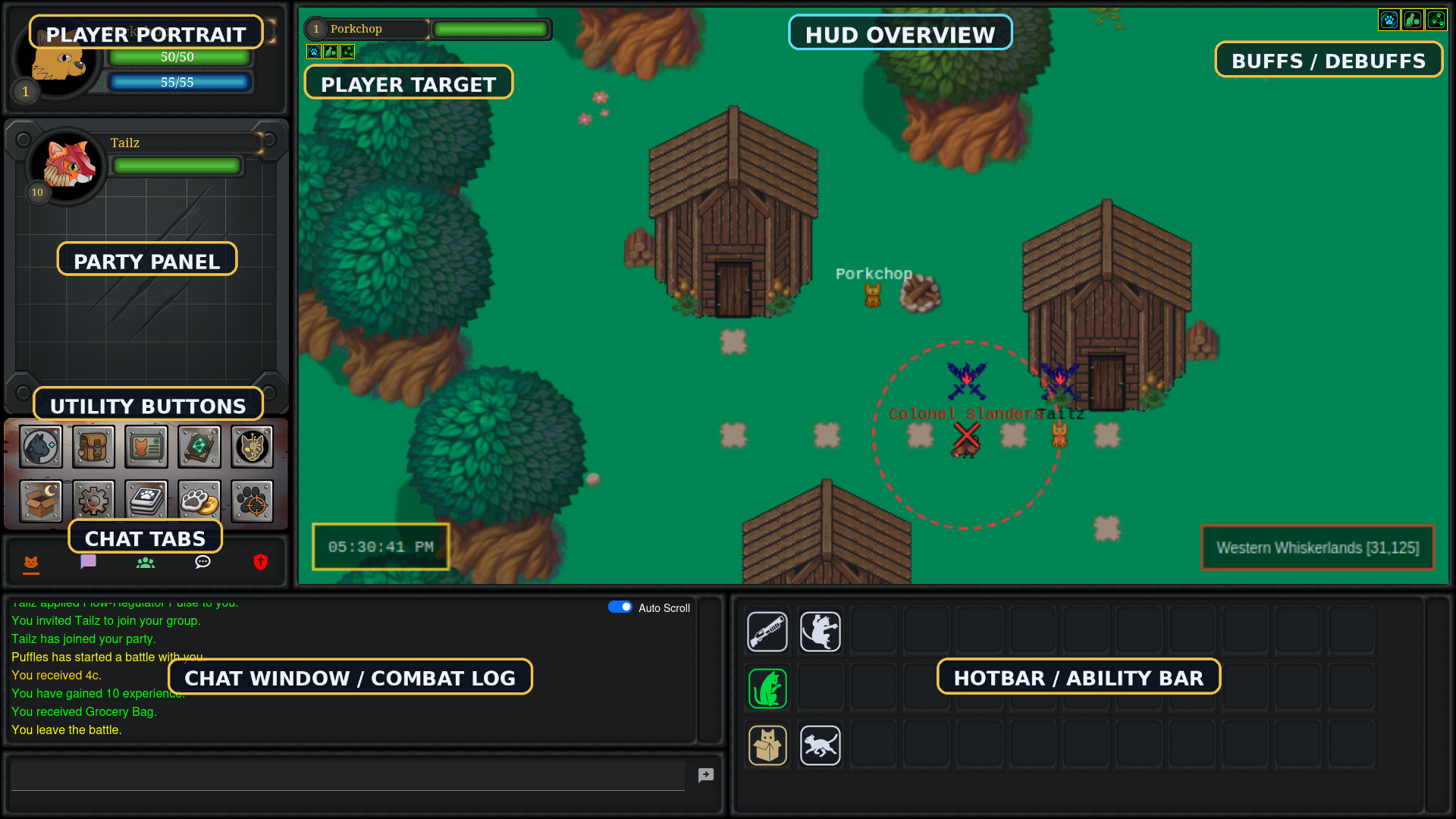
The main HUD gives you constant information about your character, your target, your party, your available abilities, and your chat channels.
Shows your name, level, HP, and Energy. Your portrait may also change when head gear is equipped.
Your active effects appear near the top-right area of the HUD. Debuffs use a red border for quick identification.
Shows your grouped allies and their health bars. You can click party portraits to target them quickly.
These open major systems like Inventory, Character Status, Codex, Patchline, Execution Deck, Trade, and Combat Assist.
Includes chat tabs, message output, and the input field. It handles local, party, zone, private, and battle text.
Your hotbar shows equipped abilities, while the target bar shows the current target’s level, name, health, and effects.
Covert Cats supports keyboard shortcuts for most of the main systems. These only work normally if your chat input box is not currently focused.
R Invite Player
I Inventory
C Character Status
X Codex
P Patchline
Q Camp
Z Settings
E Execution Deck
T Trade
F Combat Assist
F1 Target Yourself
V Toggle Vision Mode
WASD / Arrow Keys Move in the overworld
Chat in Covert Cats behaves like a browser-based MMO input system. To type, you must click into the chat input field first.
Once the chat box has focus, keyboard presses go into chat instead of controlling your cat. That means movement keys like WASD may suddenly start writing a letter to nobody instead of moving your cat.
Global, Zone, Party, Whispurrs, and Battle each filter different kinds of communication and system output.
/t playername message
Direct message
/g message
Party chat
/shout message
Zone-wide message
If Auto-Switch Chat Channels is enabled, entering combat switches to Battle and leaving combat switches back to Global.
Your hotbar contains the abilities currently equipped through the Execution Deck. It is your live action bar during normal play and battle.
Abilities may appear greyed out or unavailable when they cannot currently be used. This usually happens because:
The target bar shows your current target’s:
You can target:
Most early control problems come from one small rule being easy to miss.